
BeautyPlus-Selfie Photo Editor
PIXOCIAL TECHNOLOGY (SINGAPORE) PTE. LTD.Photography
4.531.21K Reviews
- Version
- 7.50.0
- Installs
- 500.00M
- Age Rating
- Teen
Screenshots
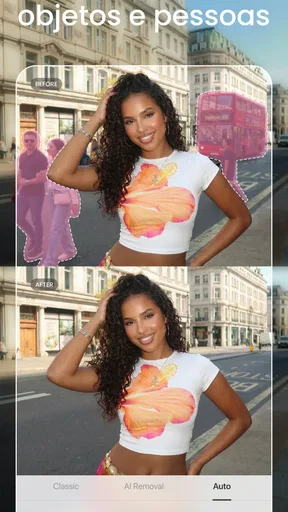
Our Review of BeautyPlus-Selfie Photo Editor
 Analysis by Appyee
I find that the trickiest part of using a selfie editor is deciding how much help I actually want from it. A quick retouch can make a portrait feel polished, but too many effects can pull attention away from the person in the photo. BeautyPlus-Selfie Photo Editor is built around that balance: it gives me playful ways to change a picture, while the best results usually come from using a light touch and checking the image at normal size before saving.
Start with the photo, not the effect
When a result looks odd, I first check the original image rather than piling on another filter. A close-up selfie taken in dim or uneven light can make skin smoothing look stronger than intended, and a dramatic filter may exaggerate that impression. I get a more natural finish by choosing a clear photo, making one small adjustment at a time, and comparing the edited version with the starting image.
That approach also helps when a tool seems difficult to control. I lower the intensity, pause to inspect the whole face, and undo an edit if it changes more than I wanted. The useful question is not whether a setting can make a visible difference, but whether that difference still looks like me.
Simple checks before editing or sharing
BeautyPlus is a free photography app from PIXOCIAL TECHNOLOGY (SINGAPORE) PTE. LTD., with optional in-app purchases ranging from ten cents to $99.99 per item. I’d treat the free starting point and paid extras as separate decisions: try the editing flow first, then decide whether anything beyond it is worth paying for. The app is rated for Everyone, though anyone choosing effects for a child should still use their own judgment about what feels appropriate.
If an edit will not save or sharing does not work as expected, I avoid repeating the same tap rapidly. I check that the phone has enough free storage, that the app is current, and that the connection is working if I’m trying to share online. Closing and reopening the app is a reasonable basic step if it stops responding. These checks are more useful than assuming a particular effect is broken.
Recover a workflow without losing the original
For an important portrait, I keep the unedited photo and treat the edited copy as a separate result whenever the workflow allows it. That gives me room to revisit the image if I later decide the smoothing, color, or decoration is too strong. I also save a version before adding several layers of effects, so one experiment does not become the only version I have.
A practical sequence is to make a restrained retouch first, choose a filter only if the image needs a consistent mood, and add a brush effect last. I inspect the image once as a small thumbnail and again enlarged: a detail that looks subtle while editing may dominate when the photo is viewed on a phone screen. If something goes wrong, returning to the original and rebuilding with fewer changes is often quicker than trying to repair a stack of edits.
When a different tool makes more sense
BeautyPlus is aimed at portraits and playful selfie edits, so I would not make it my only choice for every kind of photography. For a landscape, product shot, or a set of photos that needs consistent color treatment, a general-purpose photo editor may offer a more suitable workflow. For a quick crop or exposure adjustment, the phone’s built-in editor may also be enough, with fewer choices to sort through.
I’d skip BeautyPlus if I want every portrait to remain completely unretouched, or if I prefer editing with precise, layered controls rather than quick visual effects. Its appeal is the accessible path from selfie to finished social image, not replacing a dedicated desktop workflow. That distinction matters: a busy collection of options is only useful if it supports the result I actually want.
First Impressions and Interface
When I first opened BeautyPlus-Selfie Photo Editor, I was pleasantly surprised by its user-friendly interface. The layout is intuitive, with all the editing options neatly categorized, making it super easy to navigate. You don’t need to be tech-savvy to start enhancing your photos.
The app’s design is sleek and modern, with vibrant colors that make the whole editing experience more enjoyable. It’s like the app is inviting you to unleash your creativity.
Features That Stand Out
One of my favorite features is the retouch tool. It’s incredibly effective at smoothing out skin imperfections without making you look like a wax figure. You can adjust the intensity, so whether you want a subtle glow or a full-on glam look, you’re in control.
Next up, the magic brush tools are a game-changer. I played around with the glitter and neon brushes, and they add a fun, artistic touch to your photos. If you’re into creating eye-catching social media posts, these tools are your new best friends.
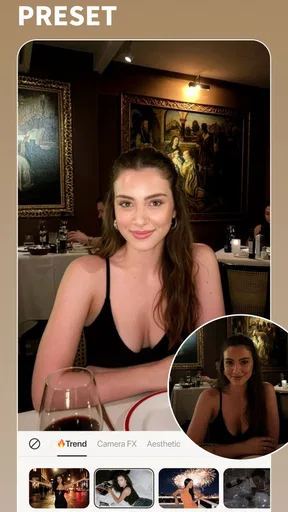
And let’s not forget the filters. There’s a wide variety to choose from, each providing a unique vibe. Whether you’re feeling vintage, dreamy, or vibrant, there’s a filter that fits the mood.
Editing Experience
Editing with BeautyPlus feels like a breeze. The adjustment sliders are responsive, allowing you to see changes in real-time. It’s incredibly satisfying to watch as your photo transforms with just a few taps.
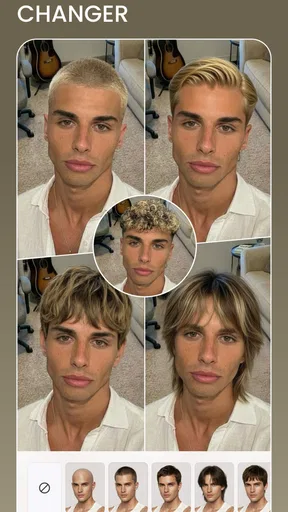
One of the coolest features is the AR effects. I tried a couple of them, and it’s like stepping into a virtual makeover studio. You can experiment with different hairstyles and makeup looks, which is perfect if you’re considering a new look in real life.
Sharing is Caring
Once you’ve created your masterpiece, sharing it is straightforward. The app integrates seamlessly with major social media platforms, letting you post your edited photos directly. It’s perfect for keeping your Instagram feed fresh and engaging.
Performance and Reliability
During my time with the app, it ran smoothly without any glitches. It’s lightweight, so it doesn’t hog your phone’s resources, which is a big plus. The developers seem to be on top of any bugs, as updates roll out regularly to fix any potential issues.
Everyday situations where it fits
I can see myself using it before posting a profile photo, making a quick portrait for a group chat, or adding a little color to a casual picture from a day out. For example, if I take a selfie during a lunch break and the lighting makes me look tired, I can try a mild retouch, compare a couple of filters, and stop as soon as the photo feels more balanced. The point is to improve the image without turning an ordinary moment into a heavily edited one.
It is especially handy when I want a result quickly and do not want to learn a more technical editor first. The live adjustments make experimentation feel approachable: I can see whether a change helps while I’m making it. For a batch of family portraits or a carefully styled portfolio, though, I would slow down and use a workflow with more deliberate control over consistency.
Choosing between quick edits and careful editing
Compared with a phone’s built-in photo editor, BeautyPlus is more focused on faces, retouching, and decorative effects. The built-in option is often the simpler choice for a crop, a small brightness correction, or a fast correction I do not want to overthink. BeautyPlus makes more sense when I want to shape the look of a selfie or add a playful finish without moving to a computer.
Compared with a general photography editor, its portrait-first approach is convenient but also narrower. A general editor is usually the better fit when I care most about precise tonal adjustments across many kinds of images. BeautyPlus is the one I would reach for when the subject is a person and the goal is a quick, expressive edit. Neither approach is automatically better; it depends on whether speed and portrait effects matter more than fine-grained control.
Small habits that improve the result
I recommend editing with the screen brightness at a comfortable, ordinary level rather than judging a photo in an unusually bright or dim setting. That helps me avoid pushing a filter too far because the display is making the image look washed out. I also take a moment to inspect hair edges and the background after retouching; an edit that seems focused on the face can still change the overall impression of a portrait.
For social posts, I decide on the destination before adding decorations. A glitter or neon brush can be fun in a close-up, but it may compete with text or other visuals in a busier composition. If I’m making several pictures for one post, I reuse a similar editing approach instead of choosing a completely different mood for every image. That gives the set a more coherent feel without requiring elaborate editing.
What to expect from the app
BeautyPlus has a 4.6 average from around 5.1 million ratings and more than 100 million installs, so it is a widely used choice in mobile photography. It launched in July 2013, and version 7.31.0 requires Android 8.0 or later. I would still check that my device meets that requirement before installing, and leave room for the app and saved photos rather than waiting until the phone is nearly full.
The app’s accessible style is a strength, but it can also make it tempting to keep adjusting after the picture already looks good. I try to set a stopping point: correct the feature that bothered me, inspect the whole image, and save. That simple limit helps keep a selfie recognizable and makes the process quicker, especially when I’m editing on the go.
Final Thoughts
Overall, BeautyPlus-Selfie Photo Editor is a fantastic tool for anyone looking to enhance their photos effortlessly. It’s packed with features that cater to both casual users and those serious about photography. The app strikes a perfect balance between being fun and functional.
If you’re ready to take your selfies to the next level, give BeautyPlus a shot. It’s like having a pocket-sized beauty studio, and trust me, your camera roll will thank you!
Privacy and Permissions
See what permissions an app requests and how it handles your data.
- Location
- approximate location (network-based), precise location (GPS and network-based)
- Photos/Media/Files
- read the contents of your USB storage, modify or delete the contents of your USB storage
- Storage
- read the contents of your USB storage, modify or delete the contents of your USB storage
- Camera
- take pictures and videos
- Microphone
- record audio
- Wi-Fi connection information
- view Wi-Fi connections
- Other
- view network connections, create accounts and set passwords, pair with Bluetooth devices, change network connectivity, full network access, run at startup, control vibration, prevent device from sleeping, Google Play license check, read Google service configuration
Verdict
Strengths of BeautyPlus-Selfie Photo Editor
- User-friendly interface, easy to navigate.
- Wide range of filters and effects.
- Advanced editing tools for perfect selfies.
- Regular updates with new features.
- Supports high-resolution image saving.
Limitations of BeautyPlus-Selfie Photo Editor
- Frequent ads can be disruptive.
- Some features require in-app purchases.
- Occasional slow performance on older devices.
- Limited options in free version.
- Requires internet for some features.
Other Releases by PIXOCIAL TECHNOLOGY (SINGAPORE) PTE. LTD.
View All
Airbrush: Face & Photo Editor
Photography4.1
Similar Picks in This Category
View All
Google Photos
Google LLC4.4

Gallery
Google LLC4.2

Picsart AI Photo Editor, Video
PicsArt, Inc.3.9

B612 AI Photo&Video Editor
SNOW Corporation4.1

Remini - AI Photo Enhancer
Bending Spoons4.1

FaceApp: Perfect Face Editor
FaceApp Technology Ltd4.3
You May Also Like
View All

Frequently Asked Questions
What features does BeautyPlus-Selfie Photo Editor offer?
BeautyPlus-Selfie Photo Editor offers a wide range of features including skin smoothing, blemish removal, and a variety of filters to enhance your photos. It also provides tools such as teeth whitening, eye enlargement, and an auto-beautify function that applies multiple effects with a single tap, making it easy to enhance your selfies.
Is BeautyPlus-Selfie Photo Editor free to use?
BeautyPlus-Selfie Photo Editor is free to download and offers many features at no cost. However, it does include in-app purchases for premium features and effects. Users can choose to subscribe to access additional tools, filters, and ad-free usage, which enhances the editing experience significantly.
Does BeautyPlus-Selfie Photo Editor require an internet connection?
While many features of BeautyPlus-Selfie Photo Editor can be used offline, an internet connection is required to access certain filters and effects that are downloaded from their server. Additionally, if you wish to use cloud storage or share your edited photos directly on social media, a connection is necessary.
Is BeautyPlus-Selfie Photo Editor safe to use on my device?
BeautyPlus-Selfie Photo Editor is generally safe to use and is available on both Google Play Store and Apple App Store, which have security measures in place. However, like any app, it requires permissions to access your photos and camera. It’s always wise to review these permissions and read privacy policies before downloading.
Can BeautyPlus-Selfie Photo Editor be used by beginners?
Yes, BeautyPlus-Selfie Photo Editor is user-friendly and designed to cater to both beginners and experienced users. The interface is intuitive, with easy-to-use tools and tutorials available to guide new users through the editing process, making it accessible for anyone looking to enhance their photos.
